Mitel 3300 Manuale Utente Pagina 128
- Pagina / 266
- Indice
- RISOLUZIONE PROBLEMI
- SEGNALIBRI

- HARDWARE USER GUIDE 1
- Chapter 1 - Before You Begin 3
- Chapter 2 - Specifications 3
- Chapter 3 - Installing 5
- Chapter 5 - Programming 7
- Chapter 6 - Troubleshooting 7
- Chapter 1 9
- 3300 ICP Hardware User Guide 10
- 2 Release 3.3 10
- Before You Begin 11
- Disclaimer 12
- Trademarks 12
- Copyright 12
- Safety Instructions 13
- 6 Release 3.3 14
- Chapter 2 15
- 8 Release 3.3 16
- Transmission Characteristics 19
- Loss and Level Matrices 19
- 14 Release 3.3 22
- Loss Plan Matrix 22
- Latin America 24
- Tone Plans 27
- 20 Release 3.3 28
- Tone Plan 28
- Release 3.3 21 29
- 22 Release 3.3 30
- Release 3.3 23 31
- 24 Release 3.3 32
- Release 3.3 25 33
- Netherlands 35
- 28 Release 3.3 36
- New Zealand 36
- Release 3.3 29 37
- Tone Plan (continued) 37
- North America 38
- Portugal 39
- 32 Release 3.3 40
- United Kingdom 41
- 34 Release 3.3 42
- E2T Compression 43
- 3300 Controller 46
- 100 Controller 46
- Configurations 47
- 250 and 700 Controller 52
- 3300 Controller Environment 63
- 3300 Controller Power 63
- 56 Release 3.3 64
- Output Power 64
- 3300 Network Services Units 65
- 3300 Universal NSU Protocols 66
- 3300 R2 NSU Protocols 67
- 3300 NSU Environment 69
- 3300 NSU Power 70
- Release 3.3 63 71
- BRI Connector Allocation 71
- 3300 Analog Services Units 72
- 66 Release 3.3 74
- CIM Connector Pin Allocations 74
- ONS Line Specifications 75
- LS Trunk Specifications 77
- Peripheral Node 80
- Peripheral Unit Components 80
- Peripheral Unit Dimensions 82
- Peripheral Unit Environment 82
- Peripheral Unit Power 83
- Peripheral Unit Cards 83
- SUPERSET HUB 94
- Release 3.3 87 95
- Digital Service Unit 96
- Digital Service Unit Power 98
- Digital Service Unit Cards 99
- DS1 Formatter Card 101
- Specifications 103
- Release 3.3 95 103
- Software Upgrades 106
- R2 signaling 107
- Line Signaling 107
- Release 3.3 101 109
- Telephone Power Options 112
- Telephone Power Sources 112
- PowerDsine In-line Power Unit 113
- 108 Release 3.3 116
- Ethernet Interface 116
- Serial Port Interface 116
- Chapter 3 117
- Installing 117
- 110 Release 3.3 118
- Parts and Equipment 120
- Information and Services 120
- Uninterruptible Power Supply 121
- System Installation Overview 122
- Installation Planner 122
- Set Programming Guide 124
- Capacity 125
- 118 Release 3.3 126
- Hardware Capacity (continued) 126
- Release 3.3 119 127
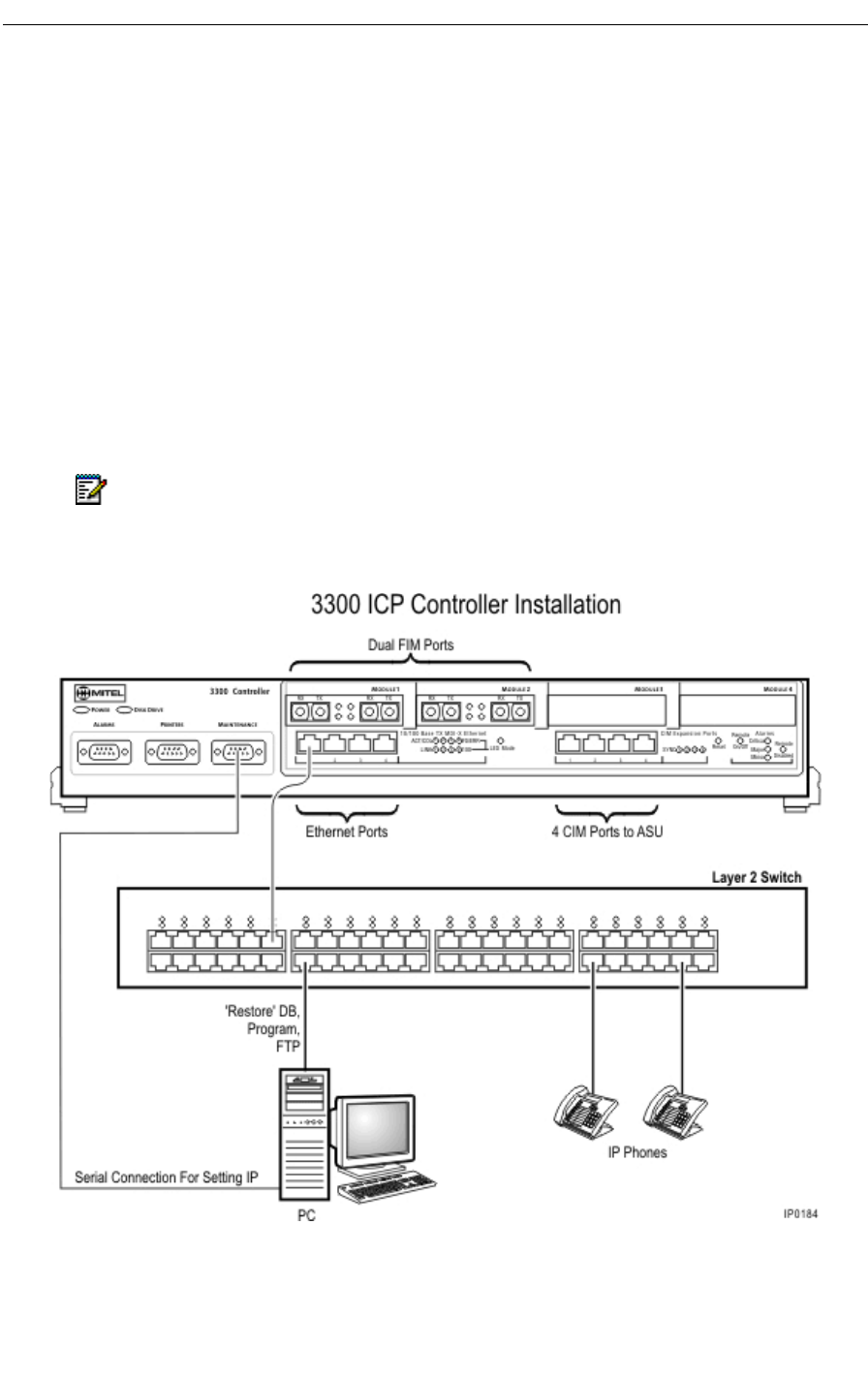
- Install the 3300 Controller 128
- Install the Hard Drive 129
- Install the System ID Module 130
- Install DSP Modules 131
- Configure the Controller 131
- Hardware Requirements 134
- Assign Domain Account 136
- Configure IIS 5 Settings 136
- Copy the identitydb.obj file 137
- Install for PRI/Q.SIG 138
- Driver for Windows 2000 139
- Install the 3300 R2 NSU 141
- Connections 142
- Install the 3300 BRI NSU 142
- Setting Up the Maintenance PC 143
- NSU Chaining 143
- Install the 3300 ASU 144
- Install the Peripheral Unit 144
- Peripheral Unit Card Layout 145
- Peripheral Unit Grounding 147
- Power Converter 148
- Cable the Unit to the MDF 149
- 142 Release 3.3 150
- Peripheral Wiring (Backplane) 150
- 144 Release 3.3 152
- Card Slot 1 153
- Card Slot 2 154
- Card Slot 3 155
- Card Slot 4 156
- Release 3.3 149 157
- Card Slot 5 158
- Card Slot 6 159
- Card Slot 7 160
- Card Slot 8 161
- Card Slot 9 162
- Card Slot 10 163
- Card Slot 11 164
- Card Slot 12 165
- Install the SUPERSET HUB 166
- DSU Card Layout 169
- Install DSU Cards 170
- Interface Assembly 170
- Install Wireless Devices 172
- Rack Mounting 175
- Shelf Mounting 175
- Powering Up 175
- Pre-Release 3.2 IP Phones 178
- 172 Release 3.3 180
- Chapter 4 181
- Install Upgrades and FRUs 181
- 174 Release 3.3 182
- SX-2000 LIGHT to 3300 ICP 202
- 3200 ICP to 3300 ICP 203
- Software 203
- Field Replaceable Units 216
- System ID Module 219
- Peripheral Node FRUs 221
- Remove a FIM 224
- Install a FIM 225
- Installation Sequence 227
- Release 3.3 227 235
- Field Replaceable Units 235
- Hardware 235
- 228 Release 3.3 236
- Hardware (continued) 236
- Release 3.3 229 237
- 230 Release 3.3 238
- Chapter 5 239
- Programming 239
- 232 Release 3.3 240
- Chapter 6 243
- Troubleshooting 243
- 236 Release 3.3 244
- System Hardware Profile 246
- Troubleshoot the 3300 R2 NSU 248
- Troubleshoot the 3300 BRI NSU 249
- Troubleshoot the 3300 ASU 250
- 244 Release 3.3 252
- Release 3.3 245 253
- Peripheral Unit 254
- Release 3.3 247 255
- 248 Release 3.3 256
- Trunk Circuit Configuration 256
- SN-1 and SN-2 Dip Switches 256
- Troubleshoot LS/GS Trunk Card 257
- 250 Release 3.3 258
- Release 3.3 251 259
- DSU Node 260
- Troubleshoot the BRI Card 261
- 254 Release 3.3 262
- BRI LEDs 262
- Troubleshoot the PRI Card 263
- Troubleshoot the R2 Card 264
- ®,™ Trademark of Corporation 266
- © Copyright 2003, Corporation 266
- All rights reserved 266
- Mitel Networks 266
Prodotti e manuali riguardandi Networking Mitel 3300
 (133 pagine)
© 2020, manymanuals.it. Tutti i diritti riservati | 0.065 s |
 Manymanuals.com
 Manymanuals.de
 Manymanuals.fr
 Manymanuals.it
 Manymanuals.pl
 Manymanuals.cz
 Manymanuals.es
 Manymanuals-pt.com
Commenti su questo manuale